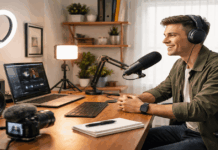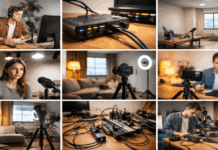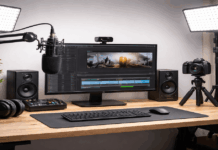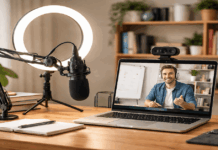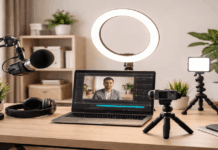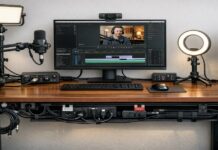
A clean video background starts with one simple question: what should the viewer notice first? In most cases, the answer should be you, your face, your voice, and the message you are trying to share.
This matters for creators recording tutorials, online meetings, product reviews, livestreams, podcasts, or videos for YouTube at home.
A clean background does not mean the room has to look expensive or empty. It means the frame feels controlled, intentional, and easy to watch.
Before changing furniture or buying a backdrop, stand where you plan to record and look behind you as if you are seeing the room for the first time.
Notice what pulls attention away from the subject. It could be a pile of clothes, a busy shelf, a bright package, an open door, or a window with movement outside. Those small distractions often show up more clearly on camera than they do in real life.
Start With the Camera Frame, Not the Room
You do not need to clean or redesign the entire room. You only need to control what the camera can see. This is why the camera angle should be the first decision.
Place the camera or webcam at eye level so the shot feels natural. A low desk angle often shows the ceiling, clutter, shadows, and awkward lines in the room.
Eye-level framing is usually calmer and more flattering, especially for talking-head videos, online lessons, and work calls.
Leave a little space above your head, keep your face centered, and check the edges of the frame. Many messy backgrounds happen because people only look at the middle of the shot. The sides often reveal cables, doors, laundry baskets, or objects that were not meant to be included.

Decide What the Background Should Communicate
Your background should quietly support your content. It does not need to explain your whole personality, but it should match the kind of video you are making.
For tutorials, a clean desk or simple wall can help the viewer focus on the lesson. For product reviews, a tidy shelf or work surface may feel more natural.
For creator content, one microphone, one tripod, or one small light in the background can hint at your setup without making the frame feel crowded.
The goal is balance. A background with no detail can look flat, but a background with too many items can feel distracting. Choose a few intentional elements and remove anything that competes with your face, movement, or voice.
Choose the Easiest Background to Control
The best background is usually the one you can keep consistent. A beautiful setup that takes 30 minutes to arrange may not be practical if you record often. A simpler corner that stays ready can be more useful in the long run.
A plain wall is the easiest option for many beginners. It removes visual noise and works with almost any camera.
The only risk is that it can look flat if the light is harsh or if you sit too close to it. Leaving some distance between you and the wall can help create a cleaner, more natural frame.
A corner can also work well because it adds depth. It gives you more control over where light falls and can make the shot feel less like an ID photo.
Just make sure the corner is not filled with random objects, boxes, or wall decorations that make the background look busy.
Also Read: Home Creator Setup for Consistent Weekly Videos

When a Backdrop Makes Sense?
A fabric backdrop can be useful if your room is crowded or shared with other people. It hides clutter quickly and gives you a consistent look even when the rest of the room changes.
Choose matte fabric instead of shiny material because reflective surfaces can catch light in a distracting way. Pull the fabric tight, clip the sides when needed, and smooth out wrinkles before recording.
Wrinkles may seem small in person, but on camera they can create lines behind your head and make the setup look unfinished.
A curtain or neutral drape can also work as a temporary backdrop. This is helpful for bedrooms, apartments, or small spaces where a full stand may not fit.
Just avoid fabric that moves too much with airflow, especially if you are recording near a fan or open window.
Make Shelves Look Curated, Not Random
Shelves can add personality, but they need control. A shelf full of bright packaging, tangled items, papers, or random decorations can pull attention away from the speaker.
If you use shelves, keep the layout simple and consistent. Group similar items together, leave some empty space, and avoid anything too shiny or colorful near your head.
A few books, one plant, or a small lamp can look intentional. Too many small objects can make the viewer’s eyes wander.
It also helps to keep the shelf looking the same across videos. When the background changes too much, the content can feel less consistent, even if the camera and lighting are the same.
Use Distance, Light, and Cropping to Reduce Distractions
A clean background is not only about removing objects. Camera placement and distance can also change how tidy the frame feels.
Moving yourself a few feet away from the background often improves the shot. It creates separation between you and the wall, softens distractions, and helps the lighting look more natural. Even a basic webcam can look better when the background is not directly behind the subject.
If you have limited space, try shifting the desk forward or angling the camera slightly so it captures the cleanest part of the room.
Sometimes the best background is not straight behind you. It may be a side wall, a curtain, or a small corner that looks calmer from a different angle.
Crop the Frame With Intention
Cropping is one of the fastest ways to hide clutter. Tighten the shot so only the cleanest part of the room appears.
For talking-head videos, a medium close-up is often enough. You do not always need to show the full desk, floor, or wall.
Avoid heavy digital zoom if possible, especially on webcams, because it can reduce sharpness and make the image look noisy. It is better to move the camera closer or adjust the tripod than to rely too much on zoom.
Lighting also affects how clean the background appears. If the background is brighter than your face, the viewer’s attention may drift behind you.
Keep the main light on you, then let the background stay softer or slightly darker. This helps the subject stand out without needing a complicated setup.
Simple Background Styles That Work Well
A plain wall setup is best for people who want a distraction-free look. It works well for online classes, work calls, and educational videos. To keep it from looking too flat, sit a little away from the wall and use soft lighting.
A minimal desk background feels more natural for tutorials, reviews, and creator content. It can show your workspace without exposing the whole room. The key is to manage cables, remove extra items, and keep only what supports the topic.
A shelf background adds warmth and personality, but it needs editing. Treat the shelf like part of the frame, not storage space. A few calm objects will usually look better than a full display of everything you own.
A backdrop is best when the room is too busy to manage. It is also useful if you share a space or need the same look every time. Just remember that the backdrop itself must look clean, smooth, and properly lit.
A virtual background should usually be a last resort. It can help in urgent situations, but it often looks fake if the lighting is weak or the edges around your hair and shoulders keep breaking. A real background, even a simple one, usually feels more trustworthy.
Do a Quick Background Check Before Recording
A short check before recording can prevent distractions from ruining the video. This does not need to take long, but it should become part of your routine.
- Check the edges of the frame for clutter, cables, doors, and bright objects.
- Make sure the background is not brighter or busier than your face.
- Remove items that do not support the video topic.
- Keep your camera height and framing consistent.
- Record a short test clip and watch it like a first-time viewer.
This small habit helps you catch problems before they become harder to fix in editing. It also makes your videos look more consistent from one recording session to the next.
Conclusion
A clean video background is not about making your home look perfect. It is about giving the viewer fewer reasons to look away.
When the frame is simple, the lighting is steady, and the background feels intentional, your message becomes easier to follow.
Start with the area the camera actually sees. Choose a wall, corner, shelf, curtain, or backdrop that you can control without too much effort. Then keep the setup repeatable so your videos feel steady and recognizable.
The best background is the one that supports your content without calling too much attention to itself.
When viewers can focus on your face, voice, and ideas, your video already feels more polished, even in a normal room.