If you wear glasses on camera, the main challenge is reflection.
Lights, windows, and screens can bounce off your lenses and create bright glare that hides your eyes.
With a few smart lighting angles and simple gear, you can get a clean, professional look using a webcam or camera in a home setup.
Why glare happens with glasses
Glare appears when a light source hits your lenses and reflects straight into the camera.
The more direct and small the light source is, the stronger and sharper the reflection looks.
A ring light placed at eye level is a common culprit because it sits close to the camera and reflects as a visible circle.
Even a bright window or a monitor can create the same problem if the angles line up. Keep light on your face, but move reflections away.
Start with the easiest fix: change the angle, not the brightness
Before buying anything, adjust placement.
Raise your key light higher than eye level
Position your main light (your key light) above your head and angle it down toward your face.
This pushes reflections downward so they do not point into the camera.
A good starting point is placing the light slightly above your forehead line, tilted down about 30–45 degrees.
Move the light off to one side
Shift the key light left or right of the camera instead of placing it directly behind the lens.
Even a small offset can remove glare. Start with the light about 30 degrees to the side, then adjust until your lenses look clear.
Tilt your glasses slightly (only if comfortable)
A tiny change in the angle of your glasses can redirect reflections.
Some people get good results by lowering the arms slightly so the lenses tilt down a bit.
Do this carefully and only if it feels natural and stable.

Use a larger, softer light source
Soft light reduces harsh reflections and makes skin look smoother. For glasses wearers, softness is often more important than raw brightness.
- Softbox: A softbox creates broad, even light and usually produces the least distracting reflections.
- LED panel with diffusion: Many compact panels work well when you add a diffuser or bounce the light.
- Ring light (with adjustments): Ring lights can work, but placement matters a lot more.
If you already have a small LED panel, add diffusion by using a softbox attachment, a front diffusion cloth, or a budget diffuser.
If you use a desk lamp, bounce it off a white wall instead of pointing it directly at your face.
Ring light tips (if you already own one)
Ring lights are popular for webcams, but they commonly create obvious reflections.
Make a ring light usable for glasses
Raise it higher than your eyes and angle it downward. Move it off-center so it is not directly behind the camera.
Reduce intensity and bring the light closer if needed (closer and dimmer can look softer than far and bright).
Add diffusion if your ring light supports a diffuser panel.
Add fill light without adding glare
A single key light can create shadows, especially under the eyes. Fill light balances the look, but it can also add more reflections if it is placed poorly.
Safe fill light placement
Use a weaker fill light on the opposite side of the key light, but keep it farther from the camera axis.
You can also fill with a reflector instead of a second lamp.
Simple fill options
A white foam board or reflector panel placed near your face, angled to bounce key light back.
A dim LED panel is placed at a lower power than the key.
A window covered with a sheer curtain for soft ambient fill (just make sure the window is not reflecting in your glasses).
Control the environment: kill unwanted reflections
Glare is not only caused by your key light. It can come from anything bright in front of you.
A practical method is to sit in position, look straight into the camera, and slowly rotate your head left and right.
If you see bright shapes sliding across your lenses, those are the sources you need to move, dim, or block.
Easy ways to block reflections
Close blinds or rotate your desk so the window is not in front of you.
Turn off ceiling lights and rely on your controlled setup and lower monitor brightness and avoid full-white screens.
Use a dark curtain or cloth opposite bright surfaces.
Use backlight to separate yourself from the background
A backlight (hair light) makes you stand out from the background without increasing reflections in your glasses.
This is especially helpful in small rooms with plain walls.
Simple backlight setup
Place a small LED light behind you and slightly above head level, aimed at your shoulders and hair. Keep it subtle.
Too bright can look unnatural, but a gentle rim of light improves depth.
Webcam and camera settings that help glasses wearers
Lighting is the main fix, but settings can prevent your camera from overreacting to bright reflections.
Lock exposure when possible
Many webcams and camera apps try to auto-correct brightness. A quick glare flare can cause the camera to darken your whole face.
If your software allows it, reduce auto exposure shifts by setting exposure manually or using “locked” exposure.
Keep your face brighter than the background
If the background is brighter than your face, the camera may expose for the background and make your face darker.
Darker faces often lead people to increase light intensity, which can create more glare. Fix the background first by dimming it.
Set white balance intentionally
Mixed lighting (window light + warm lamp + cool LED) can look inconsistent. Use one main color temperature if you can.
Many LED lights allow tuning, and most camera apps let you choose a white balance preset.
Watch for flicker
Some LED lights flicker on camera depending on local power frequency and your camera settings.
If you see flicker, try changing shutter speed or turning on an anti-flicker setting in your camera software.

Gear choices that make setup easier
You do not need expensive equipment, but certain accessories make consistent results easier.
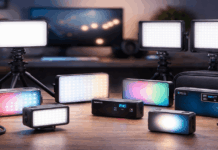
- Softbox or diffuser for your key light
- Adjustable light stand or clamp mount to raise and angle lights
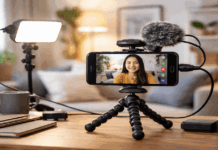
- A tripod (or webcam stand) to keep your camera position fixed
- Small LED panel for backlight or fill
- Foam board for reflection-free fill
- Grid attachment or barn doors to control spill light (helps reduce stray reflections).
Final thoughts
Clear lighting for glasses wearers comes from control: control the angle, soften the source, and remove stray reflections from your space.
With a basic light, a tripod, and a simple webcam or camera setup, you can get eye-visible, glare-free footage that looks consistent from video to video.
Once you find your working positions, mark them and repeat the same setup each time.