If you record videos or podcasts at home, your microphone budget should match your content style, your recording space, and how often you publish.
A $25 lav mic can be the right choice for daily talking-head videos, while a $400 broadcast mic can be a bad buy if your room is noisy and untreated.
The goal is not “best sound,” but best sound for your setup and the fastest path to consistent results.
Start With Your Recording Type
Before you pick a price, decide what kind of audio you actually need.
Talking-head videos at a desk
You want a voice that sounds clear and close, with minimal room echo.
Your best value is usually a USB desktop mic (simple plug-and-play), or an XLR dynamic mic + audio interface (more control, better noise handling).
Standing, moving, or filming away from your desk
You want consistent voice volume even when you turn your head.
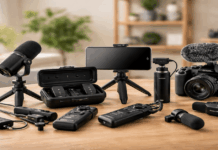
Your best value is usually Wired lav mic (cheapest reliable option), or Wireless mic kit (most flexible for video).
A wired lav like the BOYA BY-M1 is sold for around $24.99 on the BOYA store, and the DJI Mic 2 is listed at $129 or $199 on DJI’s store.
Two-person interviews
Your budget needs to cover two mics (or two transmitters) and a clean way to record both tracks.
Wireless kits get expensive faster than people expect, but they can save you time and reshoots.
Music and voice-over in a controlled space
Here, room sound matters more, and you can justify spending more on an XLR condenser mic plus basic treatment.
The Three Budget Tiers That Make Sense for Most Home Creators
Tier 1: $25–$80 — “Good enough” if your content is consistent
This is the range for creators who need clean voice audio without building a studio.
What you can buy:
- A wired lav mic (best cost-to-clarity if you don’t mind the cable).
- Entry USB mics (quality varies more here).
- Basic accessories like a small desk stand or a foam windscreen.
Who this tier fits:
- Short-form creators filming on a phone.
- Daily creators who value speed over perfect tone.
- Anyone recording in a quiet room who can keep the mic close.
Reality check:
- In this tier, your most significant upgrade is usually mic placement, not the mic itself.
Tier 2: $90–$200 — the “sweet spot” for most home setups
If you publish weekly (or more) and want your audio to sound “serious,” this tier gives you the best return.
USB desktop mic (simple setup), listed at $109.99 on Logitech’s store (sales vary).
This path is popular because it’s fast: one cable, no interface, minimal troubleshooting.
Who this tier fits:
- YouTube creators are doing tutorials, reviews, or commentary.
- Streamers who want clearer voice without jumping into pro-level spending.
- Podcasters who want cleaner sound and more control.
Tier 3: $250–$600+ — only worth it if the rest of your setup is ready
This tier is for creators who already have a stable workflow and want a specific sound or professional reliability.
A higher-end condenser mic like the RØDE NT1 5th Generation (example listing $234.99 on Sweetwater).
A pro shotgun mic for camera work, like the Sennheiser MKE 600 (example $299 on B&H).
Who this tier fits:
- Creators selling courses, client work, or paid podcasts.
- Channels where audio is the main product (voice-over heavy content).
- Anyone who has already improved their recording space and mic technique.
Don’t Spend Your Whole Budget on The Mic
For home recording, the microphone is only one part of your audio quality, so divide your budget.
A practical split that works is 60–70% microphone, 30–40% accessories, and environment.
Accessories often matter more than the mic upgrade, like a boom arm or stand that gets the mic closer without blocking your shot.
In many home rooms, spending $40–$120 on simple control and placement can outperform a $200 mic upgrade.
Choose Your Spending Based on Your “Pain Point”
If your audio is “thin” or “far away,” spend on a stand/boom arm to get closer or a mic that works well at close range (often dynamic for noisy rooms).
If your audio has “echo” or “roominess,” spend on room softening and placement changes first, then consider a mic upgrade
If your audio has “hiss” or “gain” problems, spend on a better interface or gain staging, and possibly an inline booster.
If you need freedom to move on camera, spend on a wireless kit (you’re paying for convenience and consistency).
Three Example Budgets You Can Copy
| Example budget | Best for | What you buy (typical) | Real-world price examples |
|---|---|---|---|
| $80 total | Phone videos, casual YouTube, simple voice upgrades | A wired lav mic plus a basic windscreen and a simple clip/adapter (if needed) | BOYA BY-M1 around $24.99, leaving room in the budget for small accessories and adapters |
| $180–$250 total | Desk recordings, streaming, tutorials, consistent weekly content | A USB mic and a basic stand/boom arm so the mic stays close to your mouth | Blue Yeti around $109.99, with the rest of the budget covering a basic boom arm/stand and pop protection |
| $450–$700 total | “Studio-style” home voiceovers, paid content, higher reliability | A pro mic plus a better interface/chain and proper mounting, with basic room control | RØDE NT1 5th Gen kit around $234.99 or Shure SM7B around $399, with remaining budget going to interface, boom arm, shock mount, pop filter, and simple room softening |
Tips to Pay Less
Refurbished pricing can be meaningfully lower than new, like the Scarlett Solo showing a $81.99 refurbished option compared with $169.99.
Skip “starter bundles” that include cheap accessories you’ll replace. It is usually cheaper to buy the mic you want and add one solid support item.
Use your room to save money instead of upgrading the mic too early. Recording closer to the mic, moving away from bare walls, and adding soft furnishings.
Avoid paying for features you won’t use. If you only record one voice at a desk, you don’t need multi-pattern modes or extra channels
Conclusion
If you’re building your first home setup, spending $90–$200 is usually the smartest range because it supports good sound and the accessories you need.
Only jump to $250–$600+ after you’ve fixed mic placement and your room issues, and you know exactly what limitation you’re paying to solve.